How to Use Cricut Transfer Tape Like a Pro is an essential guide for crafters looking to elevate their Cricut projects. Transfer tape plays a pivotal role in ensuring that intricate designs are seamlessly applied to various surfaces, making it a vital tool in any crafter’s arsenal. Understanding the different types and features of transfer tape can significantly enhance the quality of your projects, allowing for precise applications and flawless finishes.
This guide will walk you through the process of preparing your designs, applying transfer tape effectively, and troubleshooting common issues, ensuring you have all the knowledge needed to achieve professional-looking results with your Cricut machine.
Understanding Cricut Transfer Tape
Cricut transfer tape plays a crucial role in the application of vinyl designs and graphics onto various surfaces. Its primary purpose is to facilitate the seamless transfer of intricate vinyl cuts from the backing paper to the desired substrate, ensuring that the design maintains its alignment and integrity during the application process. Utilizing transfer tape not only simplifies the transfer but also enhances the final presentation of the project, making it a must-have for both amateur and professional crafters.Transfer tape is available in several types, each tailored to specific vinyl applications and project needs.
The selection of the right type of transfer tape is essential for achieving optimal results in your Cricut projects. Different transfer tapes cater to various vinyl materials, project complexities, and surface textures.
Types of Transfer Tape
Understanding the different types of transfer tape available can significantly enhance your crafting experience. Here are some common types and their specific applications:
- Standard Transfer Tape: This type is versatile and works well with most adhesive vinyl projects. It provides a good grip on the vinyl without being overly sticky, allowing for a smooth transfer onto surfaces.
- Low-Tack Transfer Tape: Ideal for delicate materials or intricate designs, low-tack transfer tape is less sticky than standard options. It ensures that the vinyl adheres gently, minimizing the risk of tearing or damaging the project.
- Clear Transfer Tape: This option allows for precise alignment, as it is transparent. It is particularly beneficial when applying multi-layered designs, enabling crafters to see through to the surface while positioning their vinyl cuts accurately.
- Paper Transfer Tape: Often used with high-tack vinyl, paper transfer tape is designed for applications that require a stronger hold. The paper material is easier to write on and can be particularly useful for temporary applications.
Features of Transfer Tape
When selecting transfer tape, it is essential to consider specific features that can influence the success of your project. Understanding these characteristics ensures that you choose the right tape for your unique needs.
- Adhesive Strength: The adhesive strength dictates how well the tape will hold onto the vinyl and how easily it will release onto the surface. It is crucial to select the right strength based on the type of vinyl being used.
- Thickness: Thicker transfer tapes tend to provide better durability and support for intricate designs. However, they can be more challenging to manipulate, so the thickness should match the complexity of the project.
- Material Composition: Transfer tapes can be made from plastic or paper. Plastic transfer tapes are often more durable and reusable, while paper options are often more economical for single-use projects.
- Width and Length: Considering the size of your vinyl cuts is essential. Transfer tape should ideally be wider than the vinyl design to ensure complete coverage during the transfer process.
Preparing Your Design for Transfer
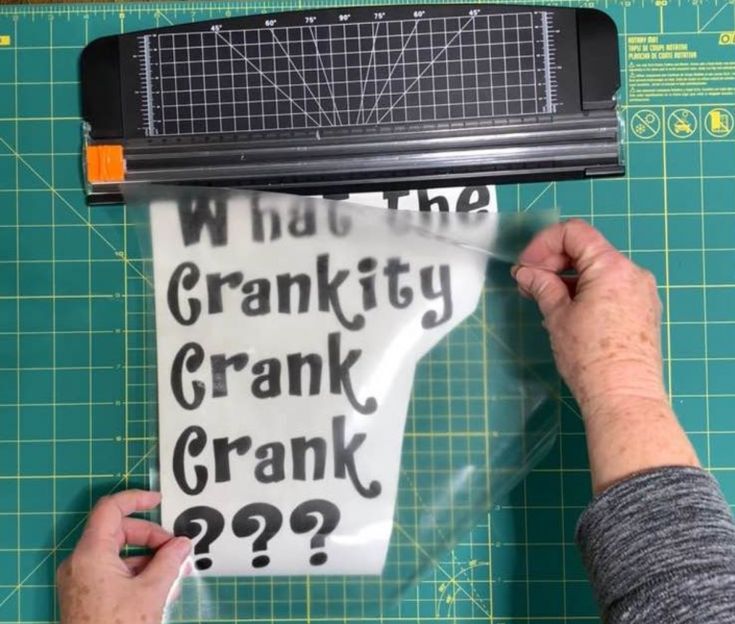
When working with Cricut transfer tape, preparing your design correctly is crucial for achieving a flawless transfer. This process involves several steps that ensure your design is cut accurately, excess material is removed effectively, and all necessary materials are readily available for application. Properly preparing your design not only enhances the final outcome but also saves time and reduces frustration during the transfer process.
Whether you’re crafting intricate decals or simple labels, understanding how to efficiently cut and weed your design is essential.
Steps to Create and Cut a Design on the Cricut
The first step in the transfer process is to create your design within the Cricut Design Space. This user-friendly software allows you to customize your projects to your liking. Once your design is set, follow these steps to cut it correctly:
1. Choose Material Settings
Select the specific material you are using for your project within the Design Space. This setting directly affects the blade depth and cutting pressure.
2. Load the Material
Place the vinyl or material onto the cutting mat, aligning it properly to ensure accuracy.
3. Connect Your Cricut
Use Bluetooth or a USB cable to connect your Cricut machine to your computer or mobile device.
4. Send to Cut
Once the design is properly positioned and settings are adjusted, click on the “Make It” button to send the design to the machine for cutting.After the cutting process, it’s essential to effectively weed out the excess material.
Weeding Excess Material Before Applying Transfer Tape
Weeding is the process of removing unwanted material from your cut design, which is critical for ensuring a clean transfer. Here are some effective tips to weed your design:
Use a Weeding Tool
A weeding tool is essential for lifting small pieces of vinyl without damaging the main design. This precision tool helps in removing intricate details with ease.
Start from the Corners
Begin weeding by lifting the corners of the design. This approach allows for better control over the removal process.
Work Slowly and Methodically
Take your time while weeding to avoid accidentally removing parts of your design. Rushing can lead to errors and wasted material.Utilizing these tips will help ensure that your design is clean and ready for the transfer process.
Materials Needed for Successful Transfer Application
Having the right materials on hand is vital for a successful transfer. Below is a checklist of items that should be prepared before beginning your transfer:To ensure a smooth transfer experience, consider the following materials:
- Transfer Tape: Choose a type suitable for your specific project, such as clear or grid transfer tape.
- Cricut Cutting Mat: Ensure you have the correct mat for your material type (LightGrip, StandardGrip, or StrongGrip).
- Weeding Tools: Include tweezers and a weeding hook for precise removal of excess material.
- Application Tool: A scraper tool aids in applying the design smoothly onto the desired surface.
- Scissors: These will be useful for cutting the transfer tape to the appropriate size.
- Surface for Application: Make sure the item you are transferring onto is clean and smooth.
By gathering these materials beforehand, you will be well-prepared to execute a successful transfer with your Cricut design.
Proper Application Techniques
Applying transfer tape correctly is essential to achieving a flawless finish with your Cricut designs. Proper techniques not only enhance the quality of your project but also save time and materials by minimizing errors. This section will guide you through the step-by-step process of applying transfer tape effectively, ensuring that your designs adhere evenly without bubbles or wrinkles.
Step-by-Step Process of Applying Transfer Tape
To achieve a professional look, follow these steps:
1. Prepare Your Materials
Gather your design on a cutting mat, the transfer tape, a squeegee or credit card, and scissors.
2. Cut the Transfer Tape
Measure the transfer tape to fit over your design, ensuring it is slightly larger than the design to allow for easy handling. Cut the tape carefully.
3. Peel the Backing Off the Transfer Tape
Start at one corner and slowly peel the backing paper away. Hold the transfer tape at a 45-degree angle to avoid any folds.
4. Position the Transfer Tape
Align the tape over your design carefully, ensuring it is centered.
5. Apply the Transfer Tape
Begin from one edge and gently lay the transfer tape down onto the design, using a squeegee or a credit card to press it down as you go.
6. Remove Bubbles
If bubbles form, use the squeegee to push them towards the edges. For stubborn bubbles, you can gently lift the tape back up and reapply it.
7. Remove the Transfer Tape
After ensuring the design is securely adhered, slowly peel the transfer tape away from the corner, keeping it at a low angle to minimize lifting the design.
Ensuring Even Application Without Bubbles or Wrinkles
Even application is crucial for the visual appeal of your projects. Here are several techniques to ensure smooth application:
Use a Squeegee
A squeegee or credit card helps to press the transfer tape onto the design firmly, which reduces the risk of bubbles and ensures full contact with the surface.
Apply Even Pressure
When using the squeegee, apply even pressure across the tape. This technique helps prevent wrinkles from developing.
Work from the Center Outwards
Start applying pressure from the center of the design and move outward to the edges. This method helps to push air out and prevents trapping it under the tape.
“The key to flawless application is even pressure and a gentle touch.”
Techniques for Applying Transfer Tape on Various Surfaces
Different surfaces may require distinct approaches for optimal application. Here are some methods tailored for various materials:
Smooth Surfaces (e.g., Glass, Metal)
For non-porous surfaces, such as glass or metal, ensure the surface is clean and dry. Use a medium to strong grip transfer tape for better adhesion.
Textured Surfaces (e.g., Wood, Fabric)
Textured surfaces may require additional care. Use a lower-grip transfer tape to avoid tearing the design upon removal. It is advisable to apply the tape slowly to ensure each part adheres before moving on.
Curved Surfaces (e.g., Tumblers, Bottles)
For curved or irregular surfaces, cut the transfer tape into smaller pieces or create relief cuts in the tape. This technique allows the tape to conform more easily to the shape without creating bubbles or wrinkles.Utilizing these techniques will ensure that your transfer tape applications are smooth and professional, enhancing the overall quality of your Cricut projects.
Removing Transfer Tape
When it comes to successfully applying your designs, the removal of transfer tape is a crucial step that can significantly impact the final result. Proper techniques for peeling off transfer tape not only preserve your design’s integrity but also enhance the overall aesthetic of your project. Understanding best practices will allow for a seamless transition from the application process to showcasing your finished work.The process of removing transfer tape should be approached with care to prevent any damage to your vinyl design.
Start by ensuring that the vinyl has adhered well to the surface before beginning to peel back the tape. The angle and technique used during removal play a vital role in protecting your project.
Best Practices for Peeling Off Transfer Tape
To ensure a successful removal of transfer tape, consider the following best practices:
- Peel Slowly and at an Angle: Always peel the transfer tape back at a 180-degree angle. This technique helps to lift the tape without pulling the vinyl away from the surface.
- Use a Weeding Tool: For designs with intricate details, employ a weeding tool to gently lift one corner of the transfer tape. This can make it easier to start the peeling process.
- Stretch the Tape: Lightly stretching the transfer tape while removing it can assist in ensuring that the vinyl adheres properly to the surface, especially for more complex designs.
Common Mistakes to Avoid
While removing transfer tape, several common mistakes can lead to problems such as vinyl lifting or tearing. Awareness of these pitfalls will improve your overall success:
- Rushing the Process: Taking your time during removal is essential. Rushing can result in vinyl lifting off the application surface.
- Wrong Removal Angle: Avoid peeling straight up as this can tug at the vinyl. Instead, aim for a flat, smooth angle.
- Skipping the Test: Before fully removing, always test a corner to ensure that the design adheres well to the surface.
Dealing with Stubborn Transfer Tape
In some cases, you may encounter transfer tape that adheres too firmly to the vinyl, causing difficulties during removal. Here are some methods to address this issue:
- Heat Application: Gently apply heat using a heat gun or hairdryer to soften the adhesive of the transfer tape, making it easier to remove.
- Use of Adhesive Remover: If persistent, consider applying a small amount of adhesive remover to the edges of the tape. Use sparingly to prevent damaging your design.
- Re-apply Pressure: If the vinyl starts lifting while you peel, press it back down with a scraper tool or credit card to keep it in place while continuing to remove the tape.
Remember, patience and technique are key when removing transfer tape to ensure that your design remains intact and visually appealing.
Troubleshooting Common Issues
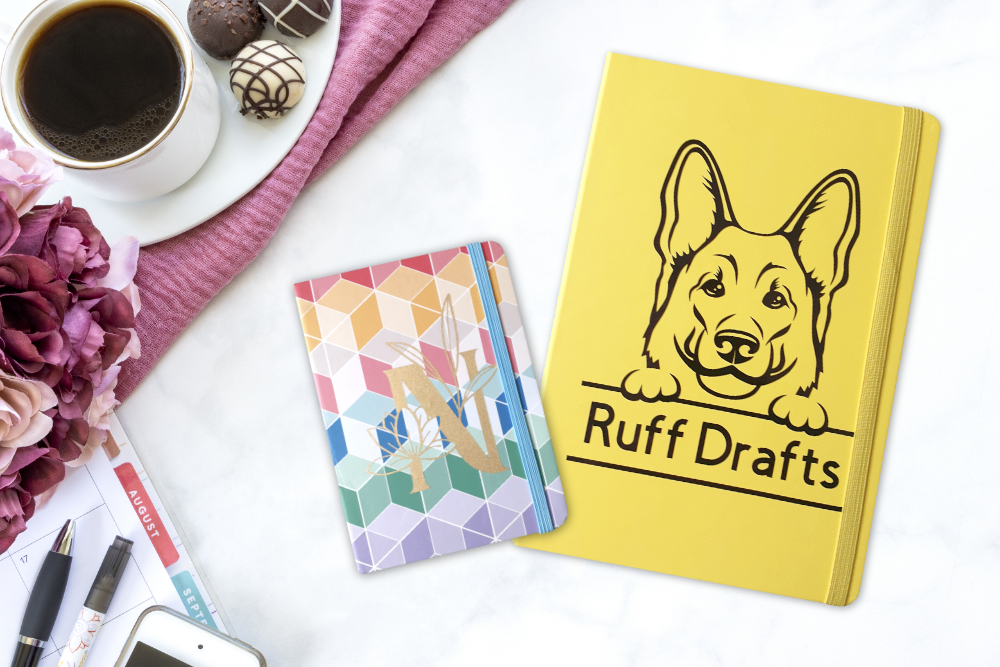
Using Cricut transfer tape can sometimes lead to challenges that may hinder your crafting experience. Understanding these common issues and their solutions will enhance your skills and ensure a smoother application process. This section will address prevalent problems encountered when using transfer tape and provide effective techniques to overcome them.
Designs That Don’t Adhere Properly
One of the most frequent issues is when the design fails to stick properly to the surface. This can occur due to various reasons, such as the type of material being used or the condition of the transfer tape itself. To ensure successful adherence, consider the following solutions:
- Check Surface Compatibility: Ensure that the surface you are applying the design to is clean, dry, and compatible with vinyl. Surfaces that are textured or oddly shaped may require additional preparation.
- Use the Right Transfer Tape: Not all transfer tapes are suitable for every type of vinyl. For intricate designs, opt for a low-tack transfer tape that can gently lift the vinyl without damaging it.
- Apply Even Pressure: When applying the transfer tape, use a scraper tool to apply even pressure across the entire design, ensuring that all areas adhere properly.
- Warm Up the Adhesive: If the vinyl is not sticking, gently warming it with a heat source may help the adhesive bond better. Be cautious not to overheat or damage the material.
- Re-apply the Design: If your design still fails to adhere, attempt to lift it gently and reposition it. Sometimes, a slight adjustment can lead to a better application.
Maintaining Transfer Tape for Multiple Uses
Transfer tape can often be reused if maintained properly. Knowing how to clean and store it effectively will maximize its lifespan and performance. Here are some essential tips for maintaining your transfer tape:
- Clean After Use: After each application, gently wipe the adhesive side with a damp cloth to remove any residue. Avoid using harsh chemicals that could degrade the adhesive quality.
- Store Properly: Keep your transfer tape flat in a cool, dry place, away from direct sunlight. If rolled, ensure it is not compressed to prevent adhesive degradation.
- Avoid Contamination: Be cautious not to touch the adhesive side with your fingers, as oils and dirt can interfere with its effectiveness.
- Test Adhesiveness: Before reusing, always test the transfer tape on a small piece of vinyl to ensure it still has sufficient tackiness to lift designs without issues.
- Labeling: If you have multiple types of transfer tape, label them for easy identification, which will help you choose the right one for specific projects.
“Proper maintenance of transfer tape not only extends its usability but also ensures optimal performance in your crafting projects.”
Advanced Techniques with Transfer Tape

Mastering transfer tape opens up a world of creative possibilities, especially for those looking to elevate their crafting skills. This section delves into advanced techniques that allow crafters to utilize transfer tape for intricate designs and layering, as well as comparing different brands and types suitable for advanced projects.
Layering Designs Using Transfer Tape Effectively
Layering designs can add depth and complexity to your projects, but it requires precision and skill. Utilizing transfer tape effectively is crucial in this process. Here are some tips to ensure successful layering:
- Prepare Each Layer: Design each layer separately in your Cricut software, ensuring that they are aligned properly. Use different colors or shades to differentiate each layer.
- Use Multiple Sheets of Transfer Tape: Cut pieces of transfer tape for each layer rather than trying to use one large piece. This approach allows for more manageable application and adjustments.
- Positioning Guides: Create a positioning guide using a straight edge or grid on your workspace. This will help you line up each layer accurately as you apply them.
- Work from the Bottom Up: Start with your base layer and progressively add each subsequent layer. This minimizes the risk of misalignment.
Using Transfer Tape for Intricate Designs and Small Items
Crafting intricate designs and working with small items can be challenging due to the delicate nature of both the materials and the designs. Employing transfer tape correctly can streamline this process. Here are key considerations:
- Select the Right Transfer Tape: For intricate designs, choose a low-tack transfer tape that provides enough adhesion to hold the vinyl without pulling up small pieces.
- Use a Weeding Tool: After cutting your design, utilize a weeding tool to carefully remove excess vinyl. This ensures that only the intended design elements remain.
- Employ a Burnishing Technique: Use a scraper tool to burnish the transfer tape onto the vinyl, ensuring that even the smallest pieces adhere properly before lifting them.
- Apply with Care: When transferring intricate designs, lay the transfer tape down gently, starting from one edge and gradually smoothing it out to avoid air bubbles.
Comparison of Different Brands and Types of Transfer Tapes for Advanced Projects
Choosing the right transfer tape is essential for achieving professional results, especially for advanced projects. Different brands offer varying properties that can influence your crafting experience. Below is a comparison of popular transfer tape options:
| Brand | Adhesion Level | Best For | Price Range |
|---|---|---|---|
| Oracal 651 Transfer Tape | Medium | General use, layering | $10 – $15 |
| Silhouette Transfer Tape | Low | Intricate designs, small items | $8 – $12 |
| Craftopia Transfer Tape | High | Heavy-duty applications | $15 – $20 |
| Vinyl Ease Transfer Tape | Medium | Layering, high detail | $10 – $14 |
Choosing the right transfer tape can significantly impact the outcome of your project, making it essential to consider each brand’s properties carefully.
Cleaning and Maintaining Transfer Tape

Cleaning and maintaining your Cricut transfer tape is essential for ensuring its longevity and consistent performance. Proper care not only helps in preserving the adhesive properties of the tape but also ensures that your designs transfer smoothly without any residue or damage.To keep your transfer tape in optimal condition, it is important to clean it after each use. This prevents the buildup of dirt, adhesive residue, and other contaminants that can affect its effectiveness.
Regular maintenance will allow you to reuse the transfer tape multiple times before it needs to be replaced.
Importance of Cleaning Transfer Tape
Cleaning your transfer tape is crucial in maintaining its adhesive quality and ensuring the best results during application. If left uncleaned, residual adhesive can build up, making the tape less effective for future uses. Here are some key benefits of cleaning your transfer tape:
- Extends the life of the tape by preventing residue buildup.
- Ensures smooth application of designs without complications.
- Reduces the risk of transferring dirt or debris to your projects.
Recommended Cleaning Supplies
Using the right cleaning supplies is essential for effectively maintaining transfer tape. Below is a list of supplies that work best in keeping your tape clean and functional.
- Gentle soap or dish detergent: Ideal for cleaning without damaging the adhesive.
- Warm water: Facilitates the removal of dirt and adhesive residue.
- Microfiber cloths: Soft and non-abrasive, perfect for gentle cleaning.
- Isopropyl alcohol: Useful for removing stubborn sticky residues.
- Spray bottle: For easy application of cleaning solutions.
Storage Tips for Prolonging Transfer Tape Life
Proper storage of your transfer tape is as important as cleaning it. By storing it correctly, you can significantly prolong its lifespan and maintain its quality.Consider the following tips for effective storage of transfer tape:
- Store in a cool, dry place away from direct sunlight to prevent adhesive degradation.
- Keep it rolled up or flat in its original packaging to avoid creasing and damage.
- Use a dedicated storage container to protect against dust and environmental factors.
“The right care and maintenance can extend the life of your Cricut transfer tape, ensuring it remains a reliable tool in your crafting arsenal.”
Closing Notes
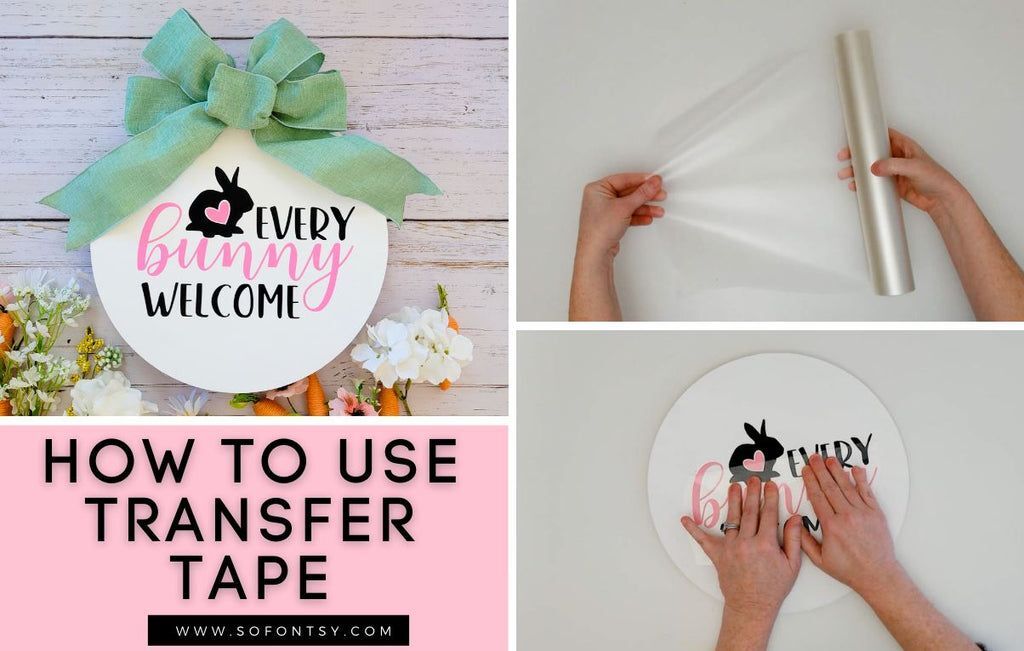
In conclusion, mastering the use of Cricut transfer tape is a crucial skill for anyone looking to create stunning crafts with precision. By following the techniques and tips Artikeld in this guide, you can avoid common pitfalls and enhance your crafting experience. Whether you’re a beginner or an experienced crafter, these insights will help you make the most of your Cricut projects, leading to successful and appealing outcomes every time.