How to Use Cricut Infusible Ink for Vibrant Mugs is a captivating journey into the world of creative expression through personalized drinkware. This innovative technique transforms ordinary mugs into stunning masterpieces, offering an array of possibilities for crafters and gift-givers alike. With its vibrant colors and durability, Infusible Ink elevates any project, making it a preferred choice for those who seek quality and uniqueness in their creations.
In this guide, we will explore the essentials of using Cricut Infusible Ink, including preparation, design creation, cutting techniques, and the transfer process. By understanding the advantages and best practices, you will unlock the full potential of Infusible Ink to create durable and eye-catching designs that are sure to impress.
Introduction to Cricut Infusible Ink
Cricut Infusible Ink is a revolutionary product designed for crafting enthusiasts who wish to create vibrant and durable designs on a variety of surfaces, particularly fabric and ceramic. This innovative ink system allows for the transfer of intricate designs onto items such as mugs, t-shirts, and tote bags, ensuring that colors remain bright and details are clear even after multiple washes.The advantages of using Cricut Infusible Ink over traditional methods such as vinyl or heat transfer vinyl (HTV) are significant.
Infusible Ink integrates directly into the surface of the material, rather than sitting on top, which results in a permanent bond. This method prevents peeling, cracking, or fading, ensuring that your creations retain their vivid appearance over time. Additionally, the range of colors and patterns available offers endless possibilities for personalization.
Required Materials for Infusible Ink Projects
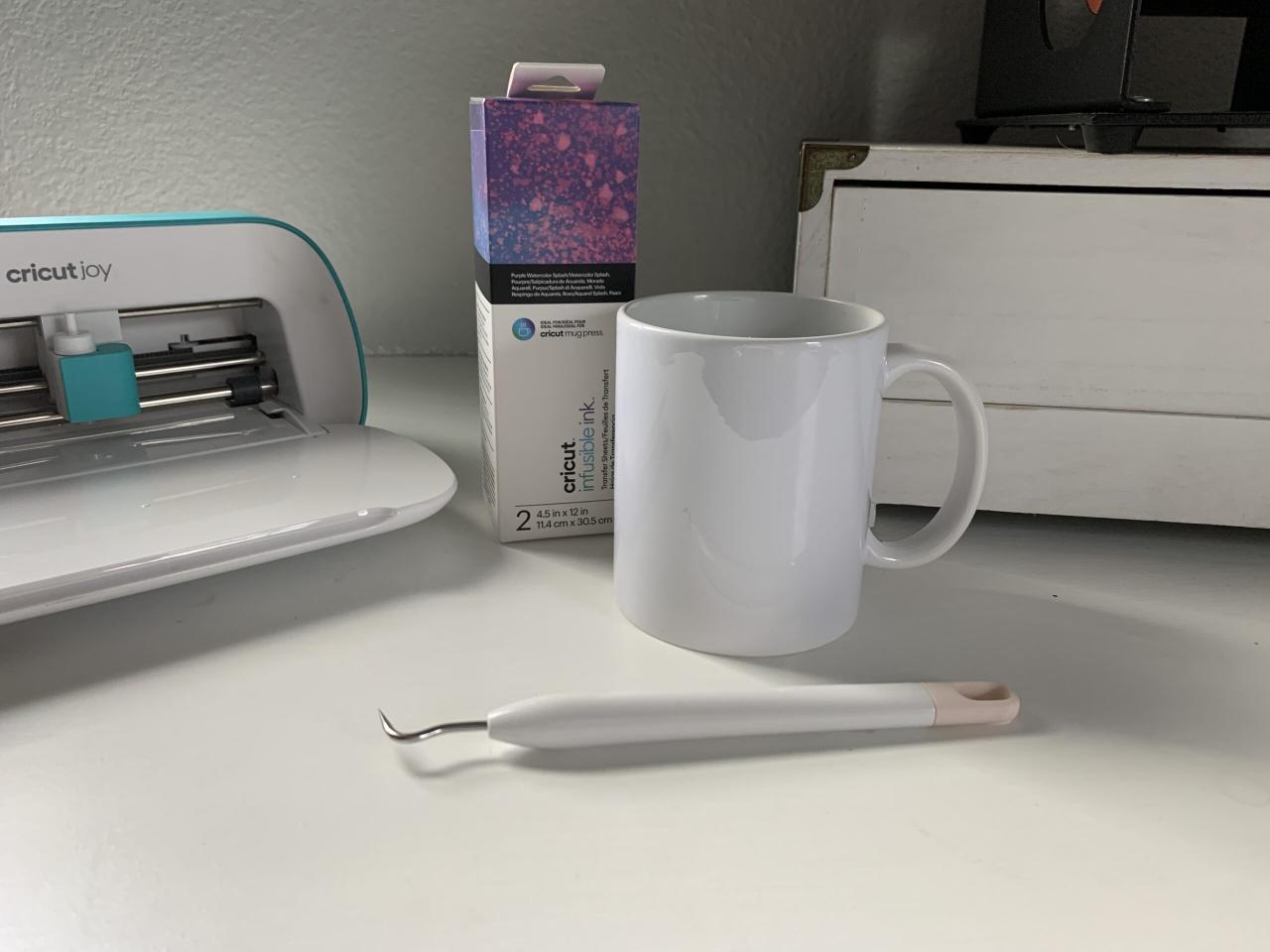
To successfully create projects using Cricut Infusible Ink, a few essential materials and tools are required. The right supplies are crucial for achieving the best results. Below is a comprehensive list of materials needed:
- Cricut Infusible Ink Sheets or Pens: These are specially formulated inks designed for use with Cricut machines, available in various colors and patterns.
- Cricut Machine: A cutting machine capable of accurately cutting your designs from Infusible Ink sheets.
- Infusible Ink Compatible Blanks: Items specifically designed to work with Infusible Ink, such as ceramic mugs, polyester shirts, and tote bags.
- Heat Source: A Cricut EasyPress or heat press is necessary for applying heat and transferring the ink onto the surface.
- Parchment Paper: This is used during the heat transfer process to protect your heat source and the project from excess ink.
- Weeding Tools: These tools help to remove any excess material from your designs post-cutting.
Using the right combination of materials ensures your Infusible Ink projects not only look professional but also last for a long time. Each item plays a unique role in the crafting process, contributing to the quality and durability of the final product.
Preparing Your Mug for Infusible Ink
To achieve striking results with Cricut Infusible Ink, it is crucial to properly prepare your mug before application. The right preparation ensures that the ink adheres well to the mug’s surface and produces vibrant, long-lasting designs. Following the correct procedures will not only enhance the quality of your creations but also increase their durability.Selecting the appropriate type of mug for Infusible Ink application significantly influences the outcome.
To achieve optimal results, it is essential to use mugs specifically designed for this technique.
Best Types of Mugs for Infusible Ink Application
Using the correct type of mug is imperative for successful application of Infusible Ink. Mugs that are compatible with this process are typically made from polymer-coated materials that allow for proper ink transfer and bonding. The following are suitable options:
- Cricut Infusible Ink Mugs: Specifically designed for this application, these mugs provide a reliable surface for the ink to adhere to.
- White or Light-Colored Mugs: Mugs with a white or light-colored base enhance the vibrancy of the colors used in the design.
- Polymer Coated Mugs: Any mug that has a smooth, glossy, and coated surface works well for Infusible Ink application.
Cleaning Procedures for Proper Adhesion
Ensuring the mug is clean and free from oils, dust, or residues is crucial for optimal adhesion of Infusible Ink. Any contaminants on the surface can hinder the transfer process, resulting in less vibrant or uneven designs. Follow these cleaning procedures to prepare your mug effectively:
- Wash the Mug: Start by washing the mug with warm, soapy water. Use a non-abrasive sponge to remove any grease or dirt.
- Rinse Thoroughly: After washing, rinse the mug thoroughly to eliminate any soap residues that may interfere with the adhesion.
- Dry Completely: Allow the mug to air dry or wipe it down with a lint-free cloth to ensure it is completely dry before applying the Infusible Ink.
- Wipe with Alcohol: For an extra layer of cleanliness, wipe the surface of the mug with isopropyl alcohol using a cotton pad. This step helps to remove any remaining oils or fingerprints.
“A fully prepared surface is the foundation for a successful Infusible Ink project.”
Designing with Cricut Software
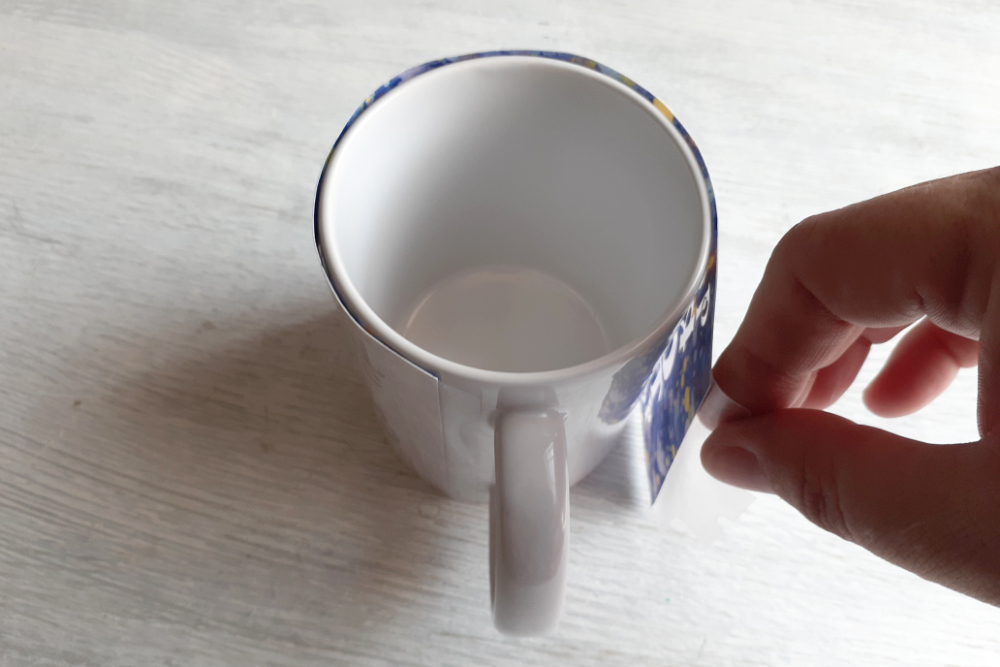
Creating a vibrant design using Cricut Design Space is an essential step in achieving stunning results with Cricut Infusible Ink. This software provides various tools and features that allow users to customize their projects for specific applications, such as mugs. Understanding how to navigate and utilize these features effectively can significantly affect the final outcome of your designs.When designing for Infusible Ink, it is crucial to consider the compatibility of colors and patterns with the ink.
Infusible Ink works best with bold, vibrant colors that can withstand the heat transfer process. The following steps will guide you through creating a design in Cricut Design Space and provide tips for selecting suitable colors and patterns.
Steps for Creating a Design in Cricut Design Space
To create a design in Cricut Design Space, follow these simple steps:
1. Open Cricut Design Space
Start by launching the Cricut Design Space application on your device.
2. Select a New Project
Click on ‘New Project’ to begin designing your mug decoration.
3. Choose Your Base Shape
Use the ‘Shapes’ tool from the left sidebar to add a rectangle or circle that represents the dimensions of your mug.
4. Add Text or Images
Incorporate text by selecting the ‘Text’ tool or use pre-existing images from the ‘Images’ tab. Ensure that your selections are compatible with Infusible Ink.
5. Customize Your Design
Use the editing tools to change the font, size, and color of your text or images to fit your aesthetic preferences.
6. Save Your Design
Once you are satisfied with your design, click ‘Save’ to ensure your work is stored for future use.Choosing the right colors and patterns for Infusible Ink is vital, as not all designs will produce the desired vibrancy or clarity once transferred.
Choosing Colors and Patterns
The selection of colors and patterns can greatly influence the end result of your Infusible Ink project. Consider the following tips when making your choices:
Bold Colors Work Best
Opt for vivid colors as they tend to show up more clearly on the substrate after the heat transfer process. Soft pastels may not yield the same intensity.
Contrast is Key
Choose designs that have a good contrast between colors. For instance, a bright design on a light-colored mug will enhance visibility and vibrancy.
Avoid Small Patterns
Intricate or tiny patterns may not transfer well. Instead, select designs that have larger, bolder elements to ensure clarity.
Test with Color Swatches
If possible, print out color swatches on Infusible Ink transfer sheets to see how the colors will appear after application.
Resizing and Formatting Designs for Mug Applications
Ensuring that your designs are appropriately sized and formatted for mugs is a critical step in the design process.
Measure Your Mug
Before resizing, take accurate measurements of your mug’s printable area. This will help you avoid any misalignment during the transfer process.
Use the Resize Tool
In Cricut Design Space, use the ‘Resize’ feature to adjust your design to fit the measured area of your mug. Maintaining the aspect ratio is important to prevent distortion.
Consider Design Placement
Think about where you want the design to be placed on the mug. Centering the design or positioning it higher or lower can achieve different visual effects.
Preview the Design
Always preview your design in the software to visualize how it will look on the actual mug before proceeding to cut.By following these steps and guidelines within Cricut Design Space, you can create a well-designed, vibrant, and professional-looking mug using Cricut Infusible Ink.
Cutting Infusible Ink Sheets
Cutting Infusible Ink sheets is a crucial step in the process of creating vibrant designs for your mugs. Proper setup and execution are essential to ensure clean and precise cuts, which ultimately affect the quality of your final product. In this section, we will delve into the necessary steps for preparing your Cricut machine, as well as best practices for handling Infusible Ink sheets.
Setting Up the Cricut Machine for Cutting
To begin cutting your Infusible Ink sheets, it is important to set up your Cricut machine correctly. Follow these steps to ensure a successful cutting process:
1. Prepare the Machine
Make sure your Cricut machine is plugged in and powered on. Ensure that the software is properly installed and updated to the latest version for optimal performance.
2. Material Selection
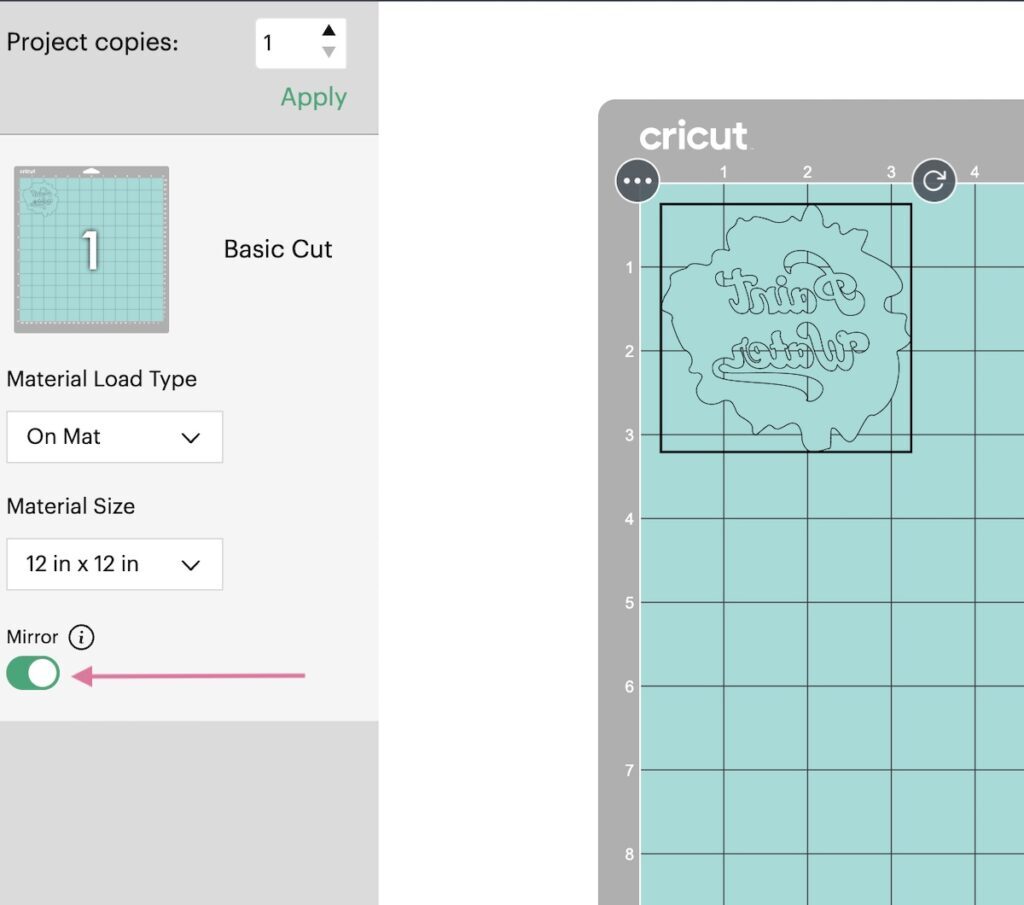
Choose the appropriate material setting for your Infusible Ink sheets. This can typically be found in the Cricut Design Space, where you can select ‘Infusible Ink Transfer Sheet’ as your material.
3. Blade Installation
Install the fine-point blade in the machine. Ensure it is securely in place, as any looseness can lead to uneven cuts.
Loading and Unloading Infusible Ink Sheets
Handling Infusible Ink sheets correctly is important for achieving clean cuts and maximizing material use. Follow these guidelines:
Loading the Sheets
Place the Infusible Ink sheet onto the cutting mat with the color side facing up. Align it with the grid on the mat for accurate positioning. Use a brayer or a scraper tool to adhere the sheet firmly to the mat, preventing any shifting during cutting.
Unloading the Sheets
After cutting, press the unload button on your Cricut machine to remove the mat. Carefully peel the Infusible Ink sheet from the mat starting from one corner to avoid any curling or damage to the design.
Importance of Blade Settings and Material Selection
The settings on your Cricut machine play a significant role in the success of your project. The correct blade settings and material selection will ensure that the Infusible Ink sheets are cut cleanly without tearing or damaging the material.
Blade Settings
It is crucial to ensure that the fine-point blade is properly calibrated. This ensures the blade cuts through the Infusible Ink sheet without excessive force, which might result in jagged edges or incomplete cuts. Regularly check the blade for wear and replace it as needed.
Material Selection
Proper selection of the material setting based on the thickness and type of the Infusible Ink sheets is essential. Using the wrong setting can either lead to an incomplete cut or excessive pressure that can damage both the blade and the material.
“Choosing the correct material settings is key to achieving professional-quality results with your Cricut machine.”
Transfer Process
The transfer process is a crucial step in achieving vibrant and durable designs on your mugs using Cricut Infusible Ink. This stage involves weeding your cut design, correctly positioning it on the mug, and applying the appropriate heat to ensure a successful transfer. Each step must be executed with precision to maximize the quality of the final product.
Weeding the Design
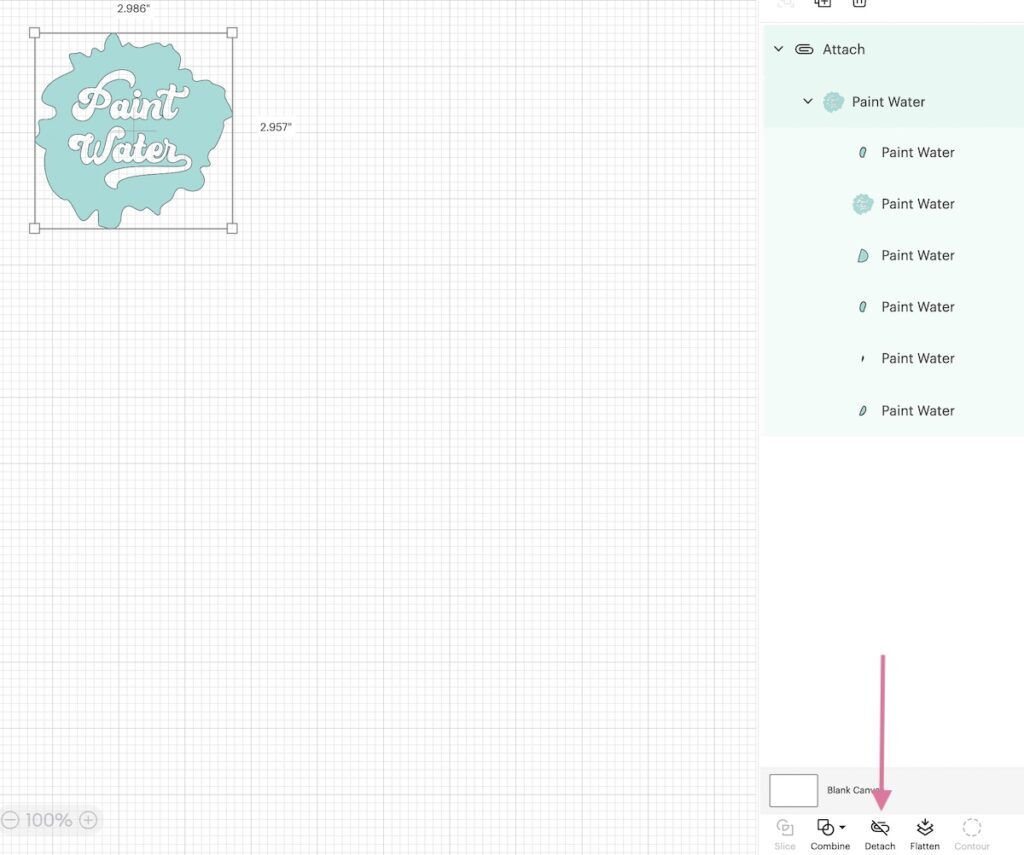
Weeding is the process of removing the excess material from the cut design, leaving only the desired elements. Proper weeding is essential to ensure the design adheres correctly to the mug and maintains its intended appearance. To weed your Infusible Ink design effectively:
- Start by peeling away the outer edges of the design, gently lifting it away from the backing sheet.
- Use a weeding tool to carefully remove any small pieces, especially from intricate areas. This tool allows for precision and prevents damage to the remaining design.
- Inspect the design for any leftover bits of ink; these must be removed to ensure a clean transfer onto the mug.
“Weeding is critical: a clean design results in a flawless transfer.”
Placing the Design on the Mug
The placement of the design on the mug is vital to achieve a professional-looking result. Proper positioning not only enhances the aesthetic appeal but also ensures that the transfer is successful.When placing your design:
- Clean the surface of the mug with rubbing alcohol to remove any oils or residues that could interfere with the adhesion.
- Center your design on the mug, making sure it is level and aligned. You can use the handle as a reference point to achieve symmetry.
- Once you are satisfied with the position, press down firmly to ensure that the transfer sheet adheres well to the mug surface.
“Precise placement guarantees that your design is positioned perfectly for transfer.”
Applying Heat with EasyPress or Heat Press
Applying heat is the final and one of the most critical steps in the transfer process. The application of heat activates the Infusible Ink, allowing it to bond with the surface of the mug. Follow these detailed steps to apply heat effectively:
- Set your EasyPress or heat press to the recommended temperature for Infusible Ink transfer, typically around 385°F (196°C).
- Preheat your mug for 30 seconds to help eliminate any moisture and ensure an even heat distribution.
- Carefully place the mug in the EasyPress or heat press, ensuring that the design is covered by a protective sheet (such as butcher paper) to prevent any smudging.
- Apply heat for the specified duration, usually around 240 seconds, ensuring that the entire design is subjected to consistent heat.
- Once the timer goes off, allow the mug to cool before removing the transfer sheet. This helps in achieving a smooth and flawless finish.
“Proper heat application is essential for a vibrant and durable design on your mug.”
Post-Application Care
Proper care of your newly decorated mugs is essential to ensure the longevity and vibrancy of the Infusible Ink designs. Following the application process, it is crucial to adopt specific practices that will help maintain the quality of your creations, allowing you to enjoy them for years to come.To preserve the vibrancy of the colors and the integrity of the designs, it’s important to follow specific washing and drying protocols.
Here are some essential guidelines that should be adhered to after applying Infusible Ink to your mugs:
Washing and Drying Recommendations
The care of your Infusible Ink mugs begins with the correct washing and drying methods. These approaches are vital to avoid fading and damage to the design.
- Hand Washing: It is recommended to hand wash your mugs instead of using a dishwasher. Use warm water and mild dish soap, gently scrubbing with a soft sponge to remove any residues without damaging the ink.
- Avoid Soaking: Do not soak your Infusible Ink mugs for extended periods as this can lead to fading of the design and deterioration of the adhesive bond.
- Avoid Harsh Chemicals: Stay away from abrasive cleaners or scrubbers that can scratch the surface and compromise the design.
- Drying: Allow your mugs to air dry completely before stacking or storing them. Heat from dishwashers or microwaves can affect the integrity of the design.
Incorporating these practices will significantly contribute to the longevity of your Infusible Ink designs, keeping them vibrant and intact.
Long-Term Preservation Tips
To maintain the beauty and functionality of your mugs for the long term, consider the following preservation tips tailored to Infusible Ink designs.
- Store Properly: When not in use, store your mugs in a safe place where they are less likely to be knocked over or scratched. Consider using protective padding or mug organizers.
- Limit Exposure to Heat: Avoid exposing your mugs to extreme heat sources, such as direct sunlight or ovens, as this can cause the designs to fade over time.
- Use for Cold or Room Temperature Beverages: While Infusible Ink designs are durable, it is advisable to primarily use these mugs for cold or room temperature drinks to extend their lifespan.
- Regular Inspection: Periodically check your mugs for any wear or damage. Early detection of issues can help you take corrective measures before the designs are compromised.
By following these care guidelines and preservation practices, you can ensure that your Infusible Ink mugs remain stunning and functional, showcasing their vibrant designs for a long time.
Troubleshooting Common Issues
When working with Cricut Infusible Ink, it’s important to be prepared for potential challenges that may arise during the application process. Understanding common issues can help you achieve the best results and create vibrant, lasting designs on your mugs. The following section Artikels frequent problems encountered and their respective solutions, ensuring a smoother crafting experience in the future.
Fading or Poor Adhesion
Fading or poor adhesion of Infusible Ink can significantly affect the quality of your final product. Such issues can occur due to several factors, including incorrect temperature settings, insufficient pressure during the transfer process, or using incompatible materials. To address these challenges, consider the following points:
- Ensure you are using the correct temperature and time settings as specified by the Infusible Ink guidelines. Typically, a temperature of 385°F for 40 seconds is recommended for most materials.
- Check the pressure applied during the heat transfer. Insufficient pressure can lead to incomplete adhesion. Use a heat press for even pressure or ensure the EasyPress is fully pressed down.
- Confirm that the blank mug you are using is compatible with Infusible Ink. Only use products specifically designed for Infusible Ink application.
- Inspect your Infusible Ink sheets for any damages or imperfections before cutting, as these can impact the final result.
- Consider preheating the mug before applying the Infusible Ink to help the ink adhere better.
Using compatible materials and ensuring proper temperature and pressure settings are crucial for successful Infusible Ink adhesion.
Design and Cutting Issues
Problems related to design and cutting can hinder the application process and lead to unsatisfactory results. Recognizing these issues allows for effective corrective measures. Here are key factors to consider:
- Double-check the dimensions of your design in Cricut Design Space to ensure it fits the mug correctly, avoiding any misalignment.
- Use a clean cutting mat to prevent the Infusible Ink from lifting or tearing during the cutting process. A sticky mat is essential for proper material handling.
- Make sure your blades are sharp and clean to achieve precise cuts. Dull blades can cause jagged edges and undesirable results.
- Adjust the cut settings based on the thickness of the Infusible Ink sheets being used. Selecting the appropriate material type ensures clean cuts.
- After cutting, carefully weed the excess material to avoid any remnants that may interfere with the application.
Proper design preparation and cutting techniques are vital for achieving crisp and vibrant results with Infusible Ink.
Color Transfer Issues
Color transfer problems can arise when the Infusible Ink does not adhere as intended, leading to unwanted color bleeding or fading. To prevent these issues, it is essential to be mindful of the following details:
- Layer colors properly in your design to avoid mixing when transferred. Ensure that each color is adequately separated and applied in the correct order.
- Use a protective sheet, such as butcher paper, during the heat transfer process to absorb any extra ink and prevent color bleeding.
- Store Infusible Ink sheets in a cool, dry place to maintain their quality and prevent any deterioration that could affect transfer results.
- Conduct a test run on a sample piece before applying your design to the final mug. This helps verify the color output and transfer quality.
- Allow the mug to cool completely before removing the transfer materials. Premature removal may affect the final appearance.
Testing and proper layering techniques can significantly reduce color transfer issues.
Creative Project Ideas
Infusible Ink opens up a world of creative possibilities for customizing mugs. This versatile medium allows crafters to explore various designs that can transform ordinary mugs into vibrant, personalized creations. Below are some unique project ideas to inspire your next crafting session.Designing mugs with Infusible Ink can be tailored for numerous occasions and themes. Whether you are looking to create gifts for loved ones or decorations for seasonal events, the following ideas showcase how Infusible Ink can enhance your mug designs.
Personalized Gifts
Personalized mugs are cherished gifts that convey thoughtfulness and care. Using Infusible Ink, you can create one-of-a-kind mugs that cater to the recipient’s unique tastes. Here are some ideas to consider:
- Monogrammed Mugs: Personalize a mug with the recipient’s initials. Choose a stylish font and contrasting colors to make the design stand out.
- Photo Mugs: Utilize Infusible Ink to apply a cherished photo directly onto the mug. This could be a family portrait, a pet picture, or a memorable vacation snapshot.
- Quote Mugs: Add an inspiring or humorous quote that resonates with the individual. Choosing a vibrant background can enhance the impact of the text.
Themed Designs
Themed mugs can bring a touch of festivity to any occasion or celebration. Infusible Ink allows for intricate designs that reflect various themes. Here are some concepts to explore:
- Holiday Mugs: Create mugs for Christmas with festive patterns like snowflakes or Santa Claus. For Halloween, consider designs featuring pumpkins or ghosts.
- Seasonal Mugs: Design mugs that celebrate the four seasons, such as floral patterns for spring, beach themes for summer, autumn leaves, and winter landscapes.
- Event-Specific Mugs: Craft mugs for special events like birthdays, weddings, or anniversaries featuring dates and names or thematic illustrations.
Seasonal or Occasion-Based Designs
Infusible Ink provides the flexibility to create designs that resonate with specific seasons or special occasions. These designs can be perfect for both personal enjoyment and gifting. Here are some ideas:
- Mother’s Day or Father’s Day: Create mugs featuring a heartwarming message or an illustration that represents their hobbies or interests.
- Graduation: Celebrate a graduate’s achievement by designing a mug that features the school’s logo, graduation year, or an inspirational message.
- Anniversary Mugs: Design a pair of mugs that reflect the couple’s shared interests or memorable moments from their relationship.
“Infusible Ink allows you to turn your personal insights and creativity into tangible, beautiful gifts that will be cherished for years.”
Concluding Remarks
In conclusion, mastering How to Use Cricut Infusible Ink for Vibrant Mugs opens up a world of creative possibilities, allowing you to showcase your artistic flair while producing functional and beautiful items. Whether crafting for yourself or creating heartfelt gifts, the techniques and tips shared in this guide will help you achieve stunning results that last. Continue to experiment and explore new ideas, as each mug can tell a unique story through the colors and designs you choose.