How to Personalize a Doormat Using Your Cricut opens the door to a world of creativity and warmth, inviting you to transform your home’s entrance into a personal statement. Personalized doormats not only enhance your home decor but also offer a unique way to express your personality and style. With the help of a Cricut machine, the process becomes not only simple but also an enjoyable crafting experience, suitable for various materials and designs.
In this guide, we will explore the significance of personalized doormats, the essential tools and materials required, and the step-by-step processes involved in creating a stunning doormat that reflects your individual taste. From design concepts to application techniques, this comprehensive overview ensures you will have all the knowledge needed to embark on your creative journey with confidence.
Introduction to Personalizing Doormats
Personalized doormats serve as a warm and inviting touch to any home, acting as a unique reflection of the homeowner’s personality and style. They not only enhance the aesthetics of entryways but also provide a welcoming message to guests. By customizing a doormat, individuals can express their creativity, celebrate special occasions, or simply add a personal flair to their home decor.When it comes to materials suitable for personalization with a Cricut, various options are available.
Common choices include coir, rubber, and vinyl. Coir doormats are popular for their natural look and durability, making them ideal for outdoor use. Rubber mats offer weather resistance and easy cleaning, while vinyl allows for intricate designs and vibrant colors. Using a Cricut to personalize these materials brings several benefits, such as precision cutting, versatility in design, and the ability to create complex patterns and text that would be difficult to achieve by hand.
Suitable Materials for Personalization
Choosing the right material for your personalized doormat is crucial for both aesthetics and functionality. Each material has distinct characteristics that can impact the final look and durability of the doormat.
- Coir: This natural fiber is durable and offers a rustic look, making it perfect for outdoor use. The texture of coir can effectively trap dirt and mud, ensuring a cleaner entrance.
- Rubber: Known for its resilience, rubber mats can withstand harsh weather conditions and are easy to clean. They are ideal for high-traffic areas and can be used both indoors and outdoors.
- Vinyl: This material is incredibly versatile, allowing for vibrant colors and detailed designs. Vinyl doormats can be customized with intricate patterns, making them suitable for personalized home decor.
“Selecting the right material for personalization not only enhances the visual appeal but also contributes to the longevity of the doormat.”
The incorporation of a Cricut machine into the crafting process elevates the potential for creativity in doormat personalization. With the ability to create detailed designs and text, users can easily bring their artistic visions to life. The precision cutting feature of the Cricut ensures that every intricate detail is captured, resulting in a polished and professional-looking finished product. Furthermore, the vast library of fonts and designs available through Cricut provides endless possibilities for personalization, enabling users to craft doormats that truly reflect their unique style and preferences.
Getting Started with Your Cricut
Personalizing a doormat with your Cricut machine can bring a unique touch to your home entryway. Before diving into the creative process, it is essential to familiarize yourself with the appropriate Cricut models, gather the necessary tools and materials, and properly set up your machine for optimal results.
Cricut Models Compatible with Doormat Personalization
Several Cricut models are well-suited for personalizing doormats, allowing for various design capabilities and features. The following models are particularly effective for this type of project:
- Cricut Maker: This versatile model is equipped with advanced cutting technology and can handle a wide range of materials, making it ideal for detailed designs and intricate patterns.
- Cricut Explore Air 2: Known for its speed and precision, this model is perfect for crafting projects that require vinyl cutting, which is essential for creating customized stencils for doormats.
- Cricut Joy: This compact machine offers portability and ease of use, suitable for smaller projects or quick personalization tasks, although it has limitations on material size.
Essential Tools and Materials for Personalizing Doormats
Preparing for your doormat personalization project requires specific tools and materials to ensure efficiency and quality. The following list Artikels the essentials needed:
- Doormat: Choose a coir or rubber doormat as your base, as these materials accept paint and stencils well.
- Adhesive Vinyl: This is used to create stencils that will allow paint to adhere only in the desired areas.
- Transfer Tape: This tool aids in transferring your vinyl stencil accurately onto the doormat.
- Cricut Cutting Mat: A standard grip or strong grip mat is necessary to keep your materials secure while cutting.
- Weeding Tool: This tool helps remove excess vinyl from your stencil, ensuring clean edges for your design.
- Paint: Choose outdoor paint that is suitable for the material of your doormat, ensuring durability against the elements.
- Brushes or Sponges: These are used for applying paint to the doormat once the stencil is in place.
Setting Up Your Cricut Machine for the First Time
Before starting your project, it is crucial to set up your Cricut machine correctly. Follow these steps to ensure a smooth setup process:
- Unpack your Cricut machine, power cord, and any included accessories from the box.
- Connect the power cord to the machine and plug it into an electrical outlet.
- Turn on the machine and follow the on-screen prompts to complete the initial setup, including selecting your language and connecting to Wi-Fi.
- Download the Cricut Design Space software on your computer or mobile device, creating an account if necessary.
- Open the software and connect your machine either via Bluetooth or USB cable, depending on your model.
- Perform a test cut using the provided materials to ensure that your machine is functioning correctly.
“Taking the time to set up your Cricut machine correctly ensures the best performance for your personalization projects.”
Design Ideas for Doormats
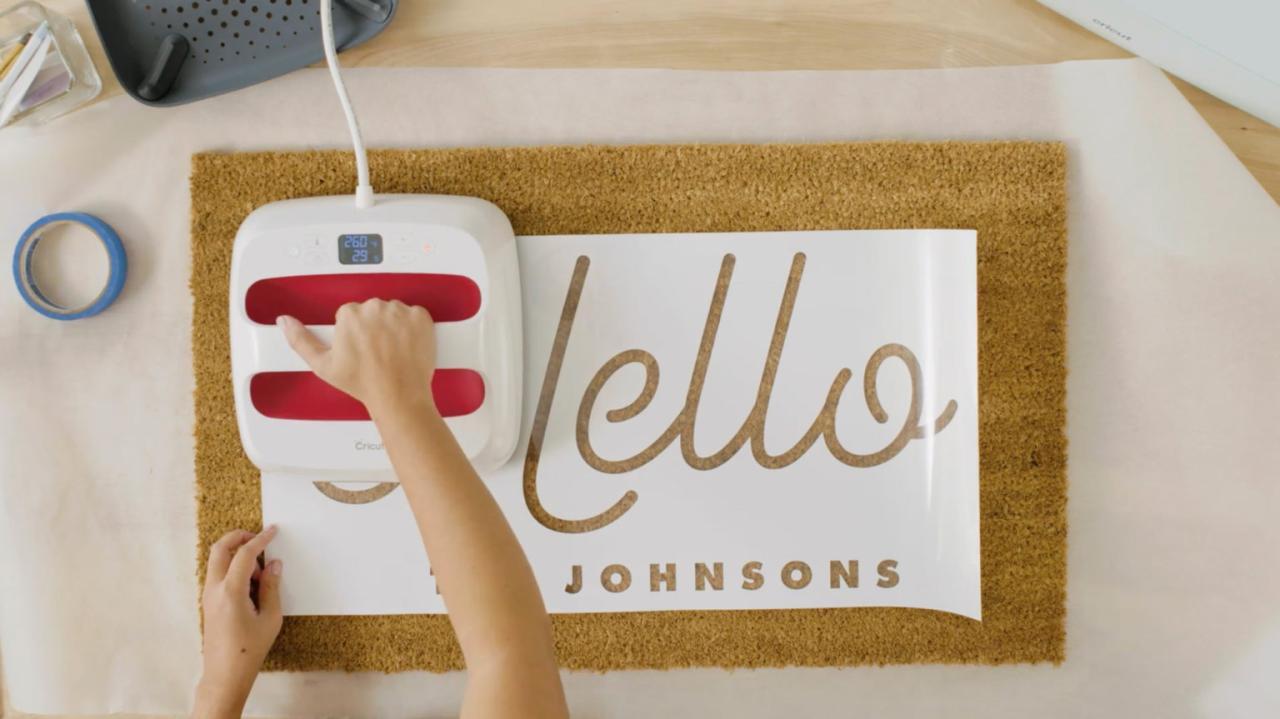
Personalizing a doormat allows homeowners to express their unique style and create a welcoming atmosphere at their entrance. This section explores various creative themes and concepts to inspire your doormat designs, ensuring that your entryway reflects your personality or seasonal spirit. Whether you prefer a minimalistic approach or an elaborate design, there are endless possibilities with the versatility of Cricut.
Creative Themes and Concepts for Doormat Designs
When designing a doormat, consider incorporating themes that resonate with your personal style or enhance the aesthetic of your home. Below are some creative themes that can transform a simple doormat into a statement piece:
- Welcome or Home Sweet Home: Classic phrases that convey hospitality and warmth. Choose elegant fonts to elevate the sentiment.
- Seasonal Greetings: Adapt your design based on seasons. For example, spring florals, summer beach motifs, autumn leaves, or winter snowflakes.
- Personalized Family Name: Showcasing your family name or initials adds a personal touch. Stylized fonts can make this design stand out.
- Pet Lovers: Incorporate playful designs that celebrate your furry friends, like paw prints or pet-related messages, enhancing the charm of your entrance.
- Inspirational Quotes: Uplifting messages can set a positive tone for the day. Choose fonts that reflect the vibe of the quote.
Popular Fonts and Text Styles for Doormats
Choosing the right font is critical to ensuring your doormat is legible and aesthetically pleasing. Various fonts and text styles can influence how your design is perceived. Here are some popular options that work exceptionally well for doormats:
- Serif Fonts: Classic serif fonts like Times New Roman or Garamond convey elegance and traditional charm, making them ideal for formal designs.
- Script Fonts: Cursive or handwritten styles, such as Pacifico or Great Vibes, add a personal touch and are perfect for welcoming messages.
- Bold Sans Serif Fonts: Fonts like Arial Black or Bebas Neue provide a modern and clean look, ensuring readability from a distance.
- Playful Fonts: Fun and whimsical fonts can add character, especially for family names or humorous quotes.
Seasonal or Holiday-Themed Design Ideas
Incorporating seasonal or holiday elements into your doormat design can create a festive spirit at your home’s entrance. Below is a list of ideas catered to different seasons and holidays:
- Spring: Floral patterns, pastel colors, or messages like “Spring is in the Air” with images of flowers or butterflies.
- Summer: Beach themes featuring seashells or sun motifs, or phrases like “Welcome to Our Beach House.”
- Autumn: Incorporate pumpkins, leaves, and phrases like “Harvest Blessings” or “Thankful & Blessed.”
- Winter: Snowflakes and cozy phrases like “Let It Snow” or holiday greetings such as “Happy Holidays.”
- Halloween: Spooky designs with bats, ghosts, and phrases like “Trick or Treat” can add a playful touch.
Creating a Design in Cricut Design Space
Creating a personalized doormat using Cricut Design Space can be a rewarding experience that allows you to express your creativity and add a personal touch to your home. This program offers a variety of design tools to help you create the perfect doormat, whether you prefer a simple monogram or a more complex graphic design. To get started with your design, understanding the interface of Cricut Design Space is essential.
The platform allows users to create unique designs by offering numerous features for customization. Importing images and text are fundamental skills that will enhance your design process.
Navigating Cricut Design Space
Familiarizing yourself with the different tools and options in Cricut Design Space is vital for creating a successful doormat design. The main workspace includes a canvas where you can view and manipulate your design, as well as a toolbar with various design elements.To import images and utilize text in your design effectively, follow these steps:
- Click on the “Upload” button on the left sidebar to bring in images from your computer.
- Select the image file you wish to use, and then click “Open.”
- Once the image is uploaded, you will have the option to edit it, including removing the background if necessary, and click “Save” to add it to your library.
- To add text, select the “Text” tool from the toolbar and type in your desired text.
After importing images and adding text, it’s essential to resize and adjust your designs to fit the dimensions of your doormat. Correct sizing ensures that your design looks proportionate and is easily readable. Consider the following steps to resize and adjust your design:
Resizing and Adjusting Designs
The dimensions of doormats typically vary, but a common size is 18 inches by 30 inches. It is essential to design within these dimensions for optimal results. The following process will assist you in resizing your design appropriately:
- Select your design on the canvas.
- In the toolbar, locate the “Size” section, which displays the width and height of your design.
- Input the desired dimensions for your doormat. Ensure that the height does not exceed 30 inches and the width does not exceed 18 inches.
- To maintain the design’s aspect ratio while resizing, click on the lock icon next to the width and height fields. This ensures that the proportions remain intact as you adjust the dimensions.
- Position the design in the center of the canvas to visualize how it will appear on the doormat.
By following these steps in Cricut Design Space, you can create a visually appealing and personalized doormat that reflects your style. The combination of imported images, custom text, and precise resizing will yield a professional-looking result.
Cutting the Design
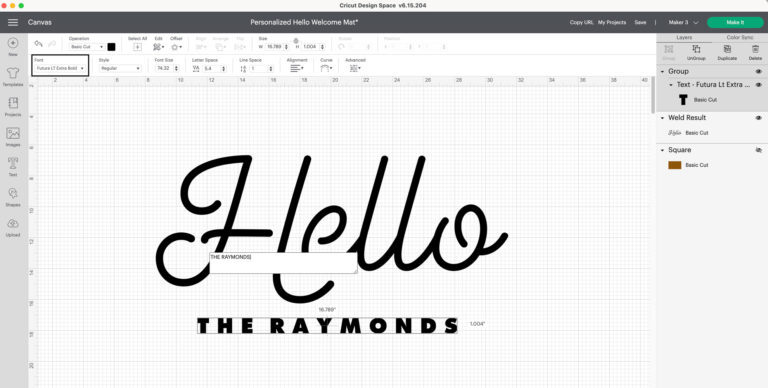
In this section, we will delve into the essential process of cutting your personalized doormat design using your Cricut machine. This stage is crucial as it determines the final quality of your doormat, ensuring that your design is executed with precision and clarity.Selecting the appropriate material and settings for cutting is the first step in achieving a successful outcome. It is important to choose a material that is compatible with your design and suitable for outdoor use, particularly for doormats.
Materials such as outdoor vinyl or heat transfer vinyl are popular choices due to their durability and weather resistance. The Cricut machine settings must also be adjusted based on the thickness and type of material you are using. Refer to the Cricut material settings guide for optimal cutting parameters.
Tips for Ensuring Clean Cuts and Accurate Designs
Achieving clean cuts and accurate designs is essential for a polished final product. Here are some tips to help you in this process:
- Ensure your blade is sharp: A dull blade can result in jagged edges and incomplete cuts. Regularly check and replace your blade as needed.
- Use a strong grip mat: A quality mat will hold the material securely in place, preventing any shifting that could distort your design.
- Test cut: Before cutting your main design, perform a test cut on a small piece of the material to adjust settings and ensure accuracy.
- Properly weed your design: After cutting, weed out the excess material carefully. This will help highlight your design and prevent any leftover vinyl from affecting the final look.
Loading the materials into your Cricut and initiating the cutting process is straightforward but requires attention to detail. Begin by ensuring the material is correctly placed on the cutting mat, aligned with the grid lines. Once the material is secure on the mat, follow these steps:
- Load the cutting mat into the Cricut machine by pressing the ‘Load/Unload’ button. Ensure the mat is snugly in place.
- Select the design you wish to cut in Cricut Design Space. Double-check that the correct material settings are applied.
- Press the ‘C’ button on the machine to start the cutting process. Monitor the machine as it works to ensure everything runs smoothly.
- Once the cutting is complete, press the ‘Load/Unload’ button to remove the mat from the machine.
Taking the time to ensure proper settings and material preparation can significantly enhance the quality of your final doormat design.
Preparing the Doormat
Proper preparation of the doormat is essential for ensuring that your personalized design adheres effectively and lasts for an extended period. Taking the time to clean and dry the surface will enhance the finish and durability of the doormat. This section Artikels the critical steps involved in preparing the doormat surface for the design application.Cleaning and drying the doormat is a vital step that should not be overlooked.
Dirt, dust, and moisture can significantly impact the adhesion of the design, leading to potential peeling or lifting over time. Therefore, ensuring a clean and dry surface will allow the adhesive to bond effectively with the doormat material.
Cleaning the Doormat
To achieve optimal adhesion, it is necessary to thoroughly clean the doormat. Here are some methods to ensure a clean surface:
- Vacuuming: Start by vacuuming the doormat to remove loose debris, dust, and dirt. This is especially important for coir or fiber doormats where particles can easily settle.
- Washing: If the doormat is machine washable, follow the manufacturer’s instructions for washing it in your washing machine. Use mild detergent and avoid bleach.
- Spot Cleaning: For doormats that are not machine washable, use a damp cloth and a mild cleaning solution to spot clean any stains or marks. Rinse with clean water and wipe off any residue.
- Drying: After cleaning, allow the doormat to air dry completely. This prevents moisture from interfering with the adhesion process. Placing it in a well-ventilated area will accelerate drying.
Ensuring Proper Adhesion
After cleaning, it is critical to take additional steps to guarantee that the adhesive bonds properly with the doormat material. Consider the following methods to enhance adhesion:
- Surface Texture: If the doormat has a textured surface, lightly sanding it can create a better grip for the adhesive. Use fine-grit sandpaper to avoid damaging the fibers.
- Using Adhesive Promoters: Before applying the design, consider applying an adhesive promoter to the doormat surface. This can create a better bond, especially on synthetic materials.
- Temperature Considerations: Ensure that the doormat is at room temperature before applying any adhesive vinyl. Cold surfaces can inhibit the effectiveness of the adhesive.
- Application Pressure: When applying the design, use a scraper to apply firm pressure across the entire surface. This ensures that the adhesive makes contact with the doormat material evenly.
Application of the Design
Applying your vinyl design onto the doormat is a critical step that determines the final look and durability of your personalized creation. This process requires careful attention to detail to ensure that your design adheres correctly and maintains its quality over time. By following the right techniques, you can achieve a professional finish, giving your doormat the perfect touch.Using transfer tape is essential for effectively applying your vinyl design.
Transfer tape acts as a medium that allows you to move your cut design from its backing to the doormat without losing its shape or alignment. The choice of transfer tape can significantly impact the application process, as different types offer varying levels of stickiness and transparency.
Techniques for Applying the Design
Understanding the following techniques will facilitate a smooth application of your vinyl design onto the doormat:
1. Preparation of the Surface
Ensure the doormat is clean and dry before application. Any dust or moisture can affect adhesion. Wipe the surface with a damp cloth and allow it to dry completely.
2. Positioning the Design
Carefully align the vinyl design on the doormat. Use a ruler or measuring tape to center the design, marking guidelines lightly with a pencil if necessary.
3. Using Transfer Tape
Cut a piece of transfer tape slightly larger than your design. Peel the backing from the transfer tape and place it sticky side down over the vinyl design, ensuring there are no air bubbles. Use a scraper tool or a credit card to press down firmly, ensuring the vinyl adheres to the transfer tape.
4. Transferring the Design
Carefully peel the transfer tape with the vinyl design from its backing. Align it with the doormat and press it down, starting from one side and moving to the other to prevent bubbles.
5. Smoothing Out Bubbles
After applying the design, use a scraper tool to smooth out any bubbles that may have formed. Start from the center and work your way outwards. For stubborn bubbles, gently lift the corner of the vinyl and reapply, smoothing out the air from underneath.
6. Finalizing Adhesion
Once the design is applied, allow it to sit for at least 24 hours before exposing it to moisture or heavy foot traffic. This waiting period ensures the adhesive bonds properly with the doormat material.By following these guidelines, you can achieve a beautiful and long-lasting personalized doormat that enhances your entrance while reflecting your unique style. Each step is crucial in ensuring a flawless application, contributing to the overall aesthetic and functionality of your creation.
Finishing Touches
To ensure the longevity and appeal of your personalized doormat, it is essential to apply the finishing touches. These steps not only enhance the aesthetic but also protect your hard work from the various elements of nature and everyday wear. Proper sealing and care will help maintain the vibrancy of your design, allowing it to welcome guests effectively over time.Sealing your design is crucial for durability.
It protects against fading, moisture, and wear, especially since doormats are often exposed to harsh outdoor conditions. This protection can significantly extend the life of your personalized doormat, ensuring it remains a functional and attractive entryway addition.
Sealing the Design
Applying a sealant to your doormat design is vital to preserve its integrity. Here are several methods to ensure your design remains protected against outdoor elements:
- Acrylic Sealer: An acrylic spray sealant is often the best choice for doormats. It provides a clear coat that resists water and UV rays. Apply a light, even coat, and allow it to dry completely before using the doormat.
- Polyurethane: For a more robust option, using a water-based polyurethane can create a durable finish. It provides excellent resistance to scratches and fading but requires careful application to avoid brush strokes.
- Fabric Protector: If your doormat is made from fabric, consider using a fabric protector spray. It helps repel water and stains, ensuring that your mat remains clean and fresh over time.
In addition to sealing, it is important to protect your doormat from outdoor elements to enhance its longevity. The following methods can help safeguard your doormat from environmental factors:
Protection from Outdoor Elements
Consider the following techniques to keep your doormat looking its best:
- Placement: Position your doormat in a sheltered area, such as under a porch or awning, to protect it from direct rain and sunlight.
- Regular Cleaning: Regularly sweep or shake out dirt and debris to prevent it from becoming embedded in the fibers, which can lead to wear over time.
- Rotation: If the doormat is reversible or has a dual design, rotating it periodically can distribute wear evenly and prolong its lifespan.
After completing your project, proper storage of unused materials and tools is essential for maintaining their condition and ensuring they are ready for future use. Here are some suggestions for effective organization:
Storage of Materials and Tools
Organizing your crafting materials and tools can streamline future projects and prevent damage:
- Use Clear Containers: Store your leftover vinyl, paints, and tools in clear, labeled containers. This allows for easy visibility and access when you start your next crafting session.
- Climate-Controlled Environment: Keep your materials in a cool, dry place to prevent damage from humidity and temperature fluctuations, which can affect vinyl and tools.
- Routine Inventory: Regularly check your supplies and tools to assess their condition and replenish any materials that are running low.
Showcasing Your Personalized Doormat
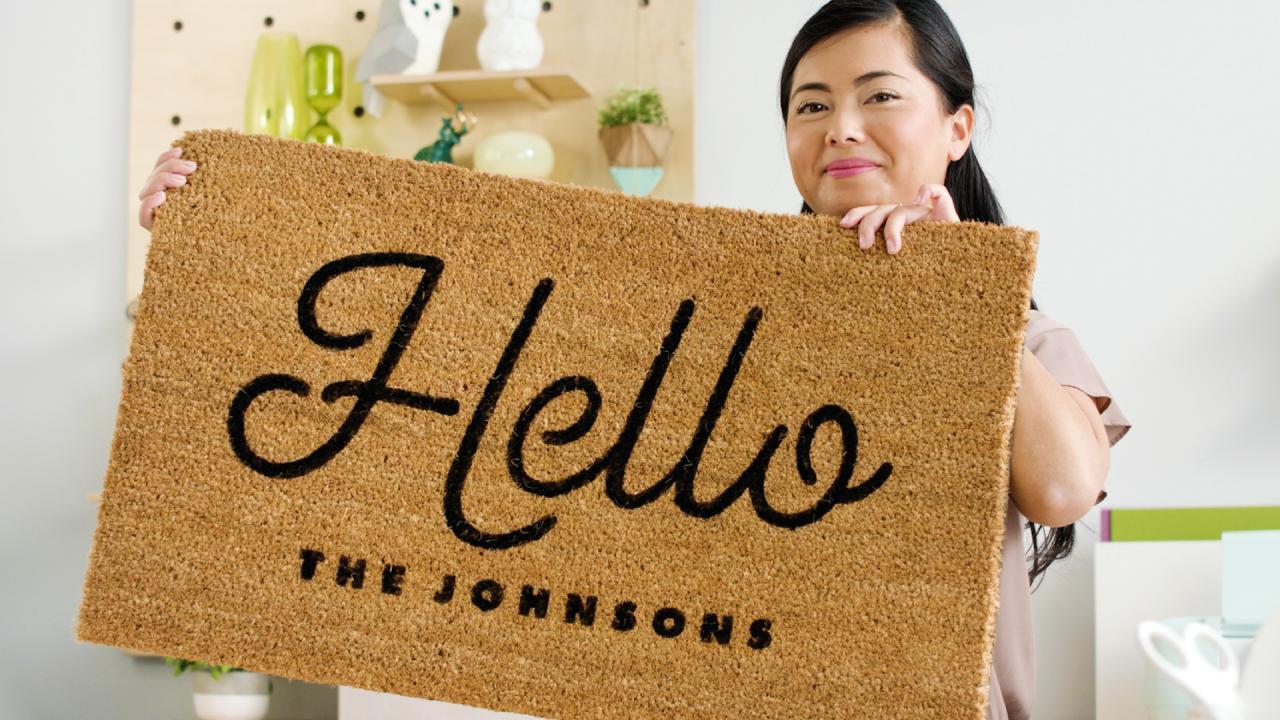
Displaying your personalized doormat effectively enhances your entrance’s appeal while welcoming guests in a unique way. By making your doormat a focal point, you not only showcase your creativity but also set the tone for your home. The right presentation can transform a simple entryway into a captivating introduction to your living space.To optimize the visual impact of your personalized doormat, consider placement and context.
Positioning it near the entrance in a well-lit area ensures that it is easily noticed. Additionally, ensure that the surrounding decor complements the design of the doormat, creating a harmonious look. The following strategies can enhance your doormat’s visibility and charm.
Displaying the Doormat as a Focal Point
Creating a captivating entrance involves strategic display techniques. Here are several ideas to consider:
- Pair with Decorative Elements: Surround your doormat with seasonal planters or decorative lanterns to draw attention. Choose items that reflect the season or your personal style, such as bright flowers in the summer or cozy pumpkins in the fall.
- Utilize a Welcome Sign: Position a charming welcome sign nearby that matches the theme of your doormat, providing a cohesive and inviting atmosphere.
- Highlight the Pathway: If your doormat is part of a larger walkway, consider adding outdoor lights or pathway markers that guide guests toward your entrance, enhancing its visibility during evening hours.
Photographing the Doormat for Social Media
Capturing the essence of your personalized doormat for social media can be rewarding. High-quality photography can enhance your online presence, showcasing your creativity to a broader audience. Here are some tips to achieve stunning photos:
- Choose the Right Time: Natural lighting is ideal. Shoot during the golden hour—shortly after sunrise or before sunset—for soft, flattering light.
- Incorporate Props: Include seasonal elements like festive decorations or seasonal flowers that complement your doormat design, enriching the overall aesthetic of the photograph.
- Experiment with Angles: Capture the doormat from various angles. A low angle shot can emphasize the texture and design, while a straight-on shot presents the doormat clearly and prominently.
Incorporating the Doormat into Seasonal Decorations
Personalized doormats are versatile and can play a significant role in your seasonal decor. Incorporating your doormat with various themes ensures that it remains a prominent feature throughout the year. Consider the following ideas:
- Seasonal Themes: Customize your doormat for each season. For instance, use a floral design for spring, beach motifs for summer, earthy tones for autumn, and festive patterns for winter holidays.
- Layering Techniques: Place your personalized doormat on top of a larger, textured mat or runner. This adds depth and interest while making the doormat stand out even more.
- Decorative Additions: Enhance the seasonal look by placing themed items on or around your doormat, such as mini pumpkins for Halloween or pinecones for winter, further enriching the entrance’s festive appeal.
Final Thoughts
In conclusion, personalizing a doormat using your Cricut is not just a crafting project; it’s an opportunity to showcase your creativity and add a welcoming touch to your home. By carefully selecting designs, materials, and techniques, you can create a doormat that serves as a charming focal point in your entrance. Remember to share your final masterpiece on social media, and don’t hesitate to experiment with seasonal themes to keep your decor fresh and inviting.